
Store (Location)
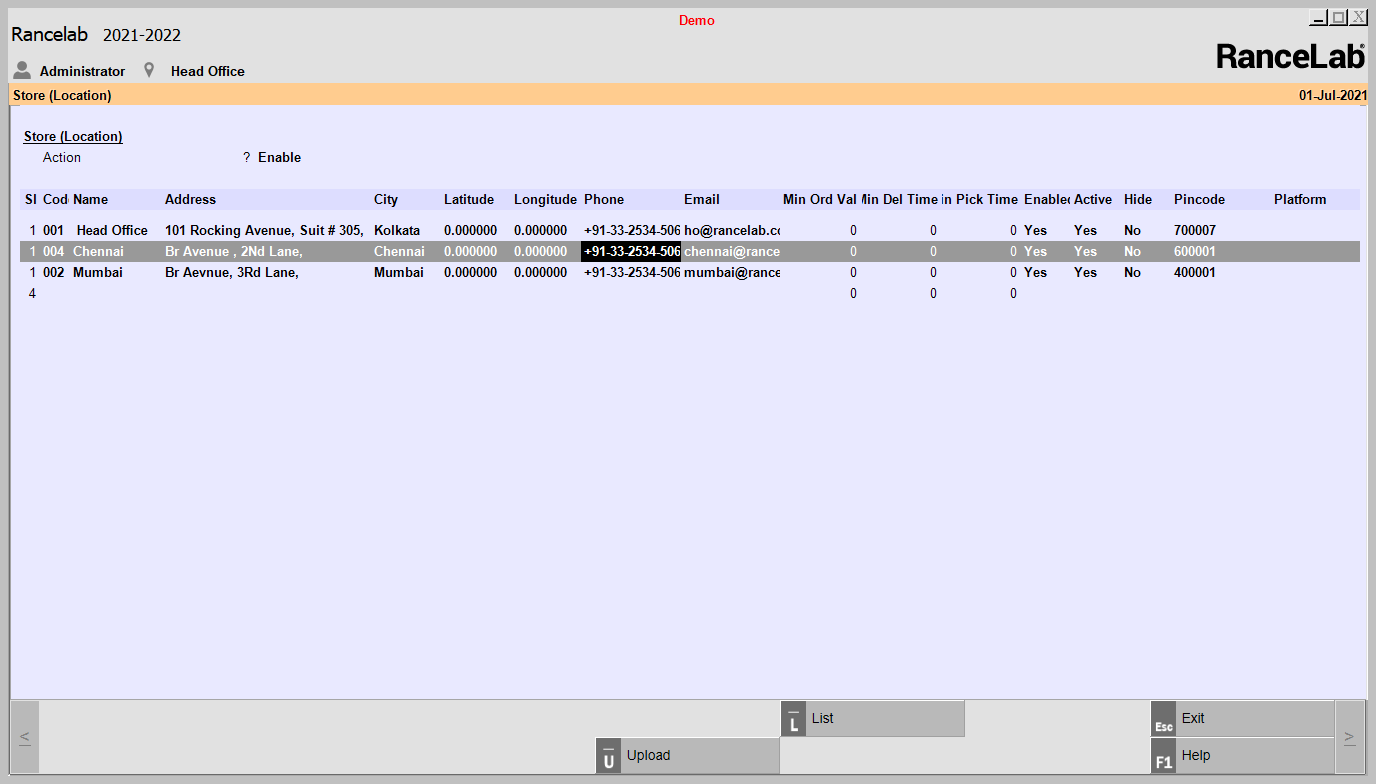
To upload Store information do the following-
In Settings >Third Party Setup > Store (Location)
Set, Action=Sync/Enable/Disable.
Action : It will show a type list = Sync,Disable,Enable
●set Action = Sync, to upload store data to The Quint
●set Action = Enable or Disable, to disable or Enable any store, respectively.
●Set Platform=Foodpanda/Swiggy/Ubereats/Zomato etc.
●To finally upload the data Press Upload button(Alt+U)
For Store location All the fields are ……
●Location code:- "Here show the list of Location and Select One by one."
●Address:- "By default, We will show Address1, Address2, and Address3."
●Phone:- Commas can separate multiple phones.
●Email:- "Commas can separate multiple Email."
●Min Delivery Time:- User Input
●Min Pickup time:- User Input
●Zip Code:- Commas can separate multiple Pin code.
●Platform:- Show list of a platform like Swiggy, Zomato, Uber Eats.