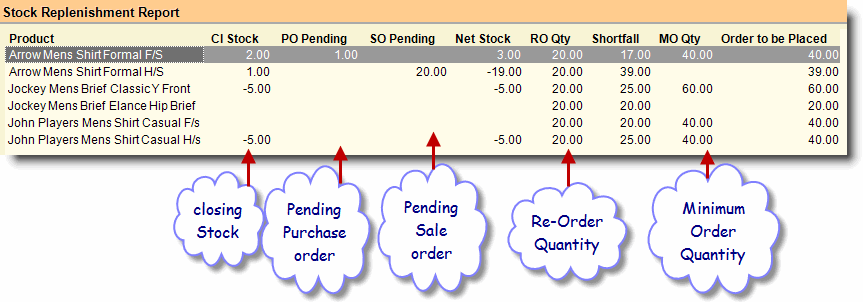
To maintain your auto purchase-order use Stock Replenishment Report.
RanceLab RanceLab will calculate required stock quantity according to the data provided by you.
To generate a Stock Replenishment Report first create a ROQ (Re-Order Quantity) master by using the “–R Define ROQ” button, available on this screen.
Columns in the Stock Replenishment Report are as follows:
Product
|
Shows name of the product.
|
Product Child ID
|
Shows child code of the product.
|
Cl Stock
|
Shows closing stock quantity.
|
PO Pending
|
Shows Pending Purchase Order Quantity.
|
SO Pending
|
Shows Pending Sale Order Quantity.
|
Net Stock
|
Shows Net Stock [(Cl Stock + PO Pending) – SO Pending].
|
RO Qty
|
Shows Re Order quantity entered for the item in the Product ROQ Master.
|
Shortfall
|
Shows Shortfall quantity. Calculate shortfall after considering the ROQ Type i.e. Calculated / Higher / Input / Lower / Sale.
|
MO Qty
|
Shows Minimum Order Quantity entered for the item in the Product ROQ Master.
|
Order to be Placed
|
Shows order to be placed for the item after considering RO Qty, Shortfall and MO Qty.
|
|
Buttons in Stock Replenishment Report are explained in Using Reports (Register) and Periodical Purchase Report. Buttons specific to the report are discussed here:
–R Define ROQ
|
Use this button will lead you to Product ROQ Master screen. Define ROQ (Re-Order Quantity) here.
|
-D Detail
|
Press ALT + D or click this button to see item child wise Stock Replenishment Report.
|
^U Pur Order
|
Press CTRL + U or click this button to copy the selected item entry row as a whole to Purchase Order Voucher. This will work in child wise report only, if the column “Order to be Placed” does not remain blank.
|
|
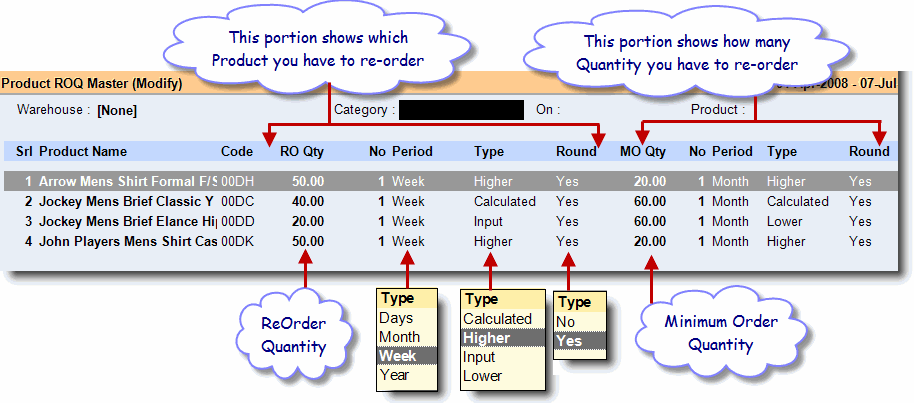
Columns in the Product ROQ Master are as follows:
|
Which product you have to re-order.
|
RO Qty
|
Re order quantity. Enter reorder qty according to your manual calculation.
|
No
|
Enter numerical value of period after which you need to reorder.
|
Period
|
Select day, week, month and year of No.
|
Type
|
Select from the following options:
Calculated: If you select this option RanceLab will populate Re-order data according to its own calculation.
Higher: It will check the calculated data with the data given by you and populate the data which is higher.
Input: It will populate data as per manual entry.
Lower: It will check the calculated data with the data given by you and populate the data which is lower.
Sale: It will check "Sale - Sale Return" in order to calculate Re-order data.
|
Round
|
Set yes / no as per your requirement of round off.
|
|
How much quantity you have to re-order.
|
MO Qty
|
Minimum Order Quantity. Enter the minimum order quantity as per your supplier, below which he will not supply the product.
|
No
|
Enter numerical value of period here during which the supplier delivers that product.
|
Period
|
Select day, week, month and year for No of the delivery period.
|
Type
|
Select any type as mentioned above.
|
Round
|
Set yes / no as per your requirement of round off.
|
Note:
Purchase Rate, MRP and Sale Rate is based on Actual Rate / Average Rate / Last Rate selected in the Stock Statement option.
|
Unit field required at Stock Replenishment Report
In the Stock Replenishment Report, some master attributes are already associated with Product name, Brand, Group, Subgroup, Department, Item Type.
The requirement is to provide a “Unit Name” column for the quantity of item which column chooser can choose.
Go to Stock Replenishment Report(W-A-Q)-->Select Product > Press(Alt+F3) > by column chooser drag this “Unit” field to see Product unit name.