
List Editor
Here you specify the properties of the drop down list from which you select an Item from the list.
List Name |
Select the list name from the list master or press Ctrl+N to create a new list. |
Display Width |
Select the width from the list (single or double). |
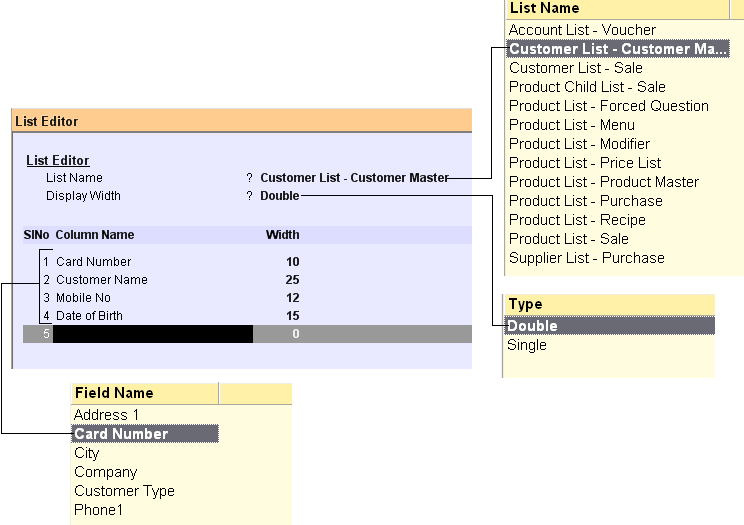
Field Particulars : Having selected the list, now you specify each column to be displayed in the list.
Column Name |
Select the column name from the list. |
Width |
Enter the width of the list. If the data is longer, the data would be truncated in the list when displayed up to the specified width. |
List Editor Button
Main Menu > Settings > Application Settings > List Editor

Require expiry matrix fields in list editor.
Scenario:
In the list editor under "Product Child List," Mfg Date and Exp Date Fields are not there, but we need this to check the date.
Solution:
"Exp Date",” Mfg Date” has been added in List Editor(TAL)
Now you can see product expiry date and manufacturing date in the product child list.
Related Faqs:
•Is it possible to customize all the lists available inRanceLab?
•Is it possible to see customer's closing balance in Sale Invoice (Scan POS) Screen?
•Is it possible to view the Street Name & Street No during Customer selection?