
Product Code & Barcode

RanceLabTM 6 generates 11 digits' code to identify each unique combination of data entered at stock received entry. Break-up of this 11 digit' code are as follows: •First 4 Digits - Alphanumeric Product Code: Uniquely identifies each product in product master •Next 4 Digits - Alphanumeric Product Child Code: Uniquely identifies a child combination against each product entered at Purchase/Production entry. •Last 3 Digits - Alphanumeric Location Code: Uniquely identifies each Location in location master. Do the following settings: 1.Set Generate Product Child = Yes / New / Unique •New: The option “New” will always generate a new product child even the other information remains the same. This helps you to clearly identify each child. •Yes: To generate new codes for each different combination of data entered during Purchase / Production entry viz., Size, Color, Design, Mfg Date, Exp Date, Rate, P Cost, MRP, S Rate, Supplier etc. •Unique: To generate unique barcode for each quantity entered during the transaction. If quantity is entered in decimal then it will create only one barcode for all products. 2.Set “Print Barcode” = Yes (Set Yes to print bar code of the Item to be used as Item sticker after each stock receipt entry). 3.Set “Use FIFO” = No (FIFO stands for “First in First Out”. If you are using barcode scanner at POS then you have to set it No, if you are not using barcode scanner at POS then you may set it Yes; then the software will automatically pick up the first child from the list) For instance: if Generate Product Child = Yes Stock-in entry done for the item in Head Office Location: 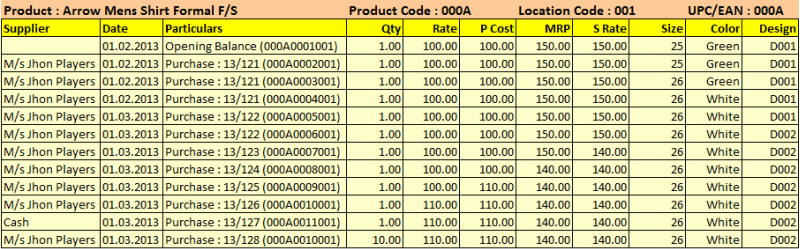 Image Summary: Generates new codes for each different combination of data entered during stock-in entry. Last three digits will be same if transacted in the same location and different if transacted in different locations. Stock-in entry done for the item in Branch-1 Location: 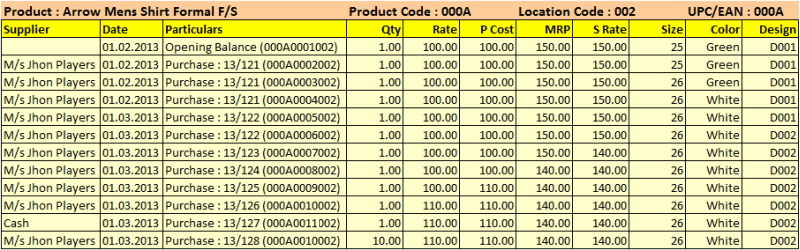 Image Summary: Generates new codes for each different combination of data entered during stock-in entry. Last three digits will be same if transacted in the same location and different if transacted in different locations. Stock-in entry done for the item in Branch-2 Location: 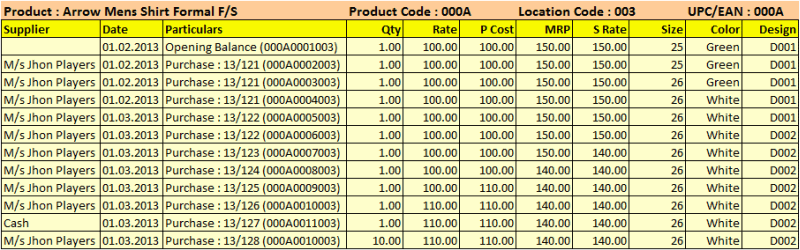 Image Summary: Generates new codes for each different combination of data entered during stock-in entry. Last three digits will be same if transacted in the same location and different if transacted in different locations. For instance: if Generate Product Child = New Stock-in entry done for the item in Head Office Location: 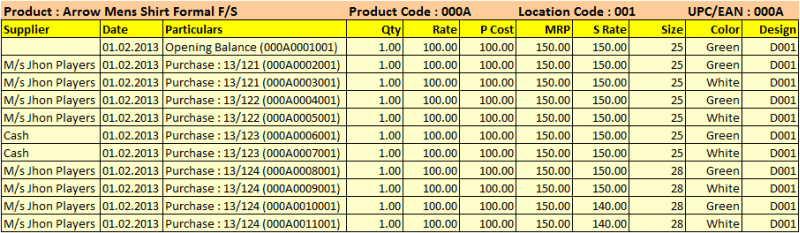 Image Summary: Generates new codes in every transaction irrespective of data combination. Last three digits will be same if transacted in the same location and different if transacted in different locations. Stock-in entry done for the item in Branch-1 Location: 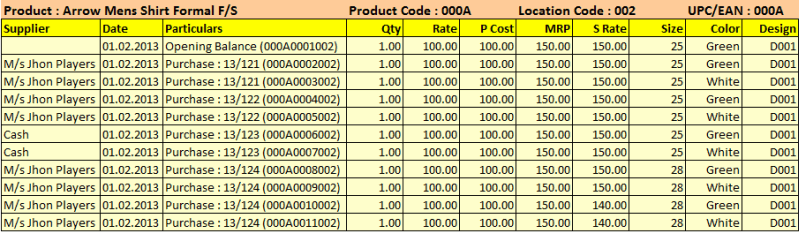 Image Summary: Generates new codes in every transaction irrespective of data combination. Last three digits will be same if transacted in the same location and different if transacted in different locations. Stock-in entry done for the item in Branch-2 Location: 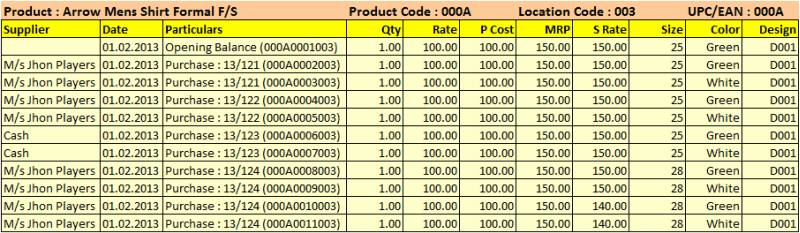 Image Summary: Generates new codes in every transaction irrespective of data combination. Last three digits will be same if transacted in the same location and different if transacted in different locations. Note: •Any changes in Generate Product Child = Yes / New / Unique will impact as stated above in all stock-in transactions like Opening Stock, Purchase Order, Purchase Challan (Receipt Note), Purchase Invoice, Stock Journal (Only Production entry). •If you set Generate Product Child = No, then the software will not generate any child code for the above transactions for any combination. However, by default the software will generate only one alphanumeric child code for every item which consists of 4 Digits Product ID + 4 Digits Child Code + 3 Digits Location Code e.g. 00010001001, though rest of the features will work as usual. •If you set Generate Product Child = Yes / New / Unique then the stock statement data can be viewed as per Actual Rate / Average Rate / Last Rate as you wish. •If you set Generate Product Child = No then the stock statement data can be viewed as per the Last Rate only. |
It uses ZERO as product child code and location code always to sale an item through Sale Invoice (Touch POS). Since child wise tracking of the item is not possible in Sale Invoice (Touch POS), it uses ZERO code always e.g. 00010000000. For Instance: Sale after Production / Purchase entry through Sale Invoice (Touch POS)  Image Summary: Always uses ZERO as product child code and location code during restaurant sale and generates product child code during production or other stock-in entries as per the Generate Product Child is set to Yes / No / New. Effect in the Stock Statement due to above transactions: Stock Statement (W > R > S) > Press CTRL + S or click "^S Item Summ” button to see item summary report:  Image Summary: shows combined data of all of the product child codes. Stock Statement (W > R > S) > Press CTRL+D or click “^D Item Det” button to see child wise report:  Image Summary: shows segregated data of all of the product child codes. Note: •In the Sale Invoice (Scan POS), you can sale the products child code wise. |
RanceLabTM 6 allows users to enter UPC / EAN code against each product created. By doing this you save your time, money and energy of buying, printing and sticking the barcode label during stock receive entry. When you create a product, scan an UPC / EAN barcode in UPCE/EAN Code field. Also do the following settings: 1. Set “Generate Product Child” = No (RanceLabTM 6 generates new child-code for each unique combination of data entered during stock receive entries. In case you are using UPC/EAN code, setting this field value to NO will not generate any child code) 2. Set “Print Barcode” = No (Since we are already using an UPCE/EAN code, we do not need to print the barcodes.) 3. Set “Use FIFO” = No (FIFO stands for “First in First Out”. If you are using barcode scanner at POS then you have to set it No, if you are not using barcode scanner at POS then you may set it Yes then the software will automatically pick up the first child from the list) Note: •If you set Generate Product Child = No, then the stock statement data can be viewed as per the Last Rate only. •If you set Generate Product Child = No, then the software will not generate any child code for the above transactions in any combination. However, by default the software will generate only one alphanumeric child code for every item which consists of 4 Digits’ Product ID + 4 Digits’ Child Code + 3 Digits’ Location Code e.g. 00010001001, though other features will work as usual. |
This code is defined by the user but other than the UPC / EAN. RanceLabTM 6 allows users to specify their own identification code for each product and identify them at POS with the same code instead of name or code generated by itself. When you create a product, enter this data in User Defined Code field. Also do the following settings: 1. Set “Generate Product Child” = No (RanceLabTM 6 generates new child-code for each unique combination of data entered during stock receive entries. In case you are using User Defined Code, setting this field value to NO will not generate any child code) 2. Set “Print Barcode” = No (Since we are already using an User Defined Code, we do not need to print the barcodes.) 3. Set “Use FIFO” = Yes (FIFO stands for “First in First Out”. If you have forgotten to set Generate Product Child = No, then RanceLabTM 6 will generate multiple child based on each unique combination of data entered at stock receive entry. On setting this field value to Yes the software will automatically pick up the first child from the list else you can set it No if you have entered Generate Product Child = Yes) Note: •If you set Generate Product Child = No, then the stock statement data can be viewed as per the Last Rate only. •If you set Generate Product Child = No, then the software will not generate any child code for the above transactions in any combination. However, by default, the software will generate only one alphanumeric child code for every item which consists of 4 Digits’ Product ID + 4 Digits’ Child Code + 3 Digits’ Location Code e.g. 00010001001, though other features will work as usual. |
Need "Supplier Name" variable in DOS Product Barcode
Added a variable <TRANSACTION-SUPPLIERNAME> in Barcode Printing.
Barcode Label Printing for Food Tag
Now you can print food tags on barcode printer for take away or home delivery transactions.
●Added following Sales Option to enable Food tag in STS, STT Table and Take-away mode:
i. Print Food Tag = No / HD / HD + Quick / HD + Table / HD + Table + Quick
ii. Print Food Tag on = KOT Printer / Barcode Printer (DOS)
It will print the food tag based on the print tag option defined in menu master.
●DOS Barcode of Food Tag.
It will use the barcode printer defined on the station.
Added option to use vendor’s barcode rather than software generated barcodes
Scenario : Some you might want to use barcodes supplied by vendor. The barcodes lengths might be 6 to 13 digits or higher for each size and color of the same product. To implement this we have added following options in Sales Voucher option scan field:-
1.Default + Matrix Field 1
2.Default + Matrix Field 2
3.Default + Matrix Field 3
Notes:
1. It will look for default UPC / EAN and if not found it will search for matrix field.
2. If same code is found in multiple child then it will show the list.
FIFO is used as an inventory costing method which assumes that the first items placed in inventory are the first sold. Thus, the inventory at the end of a year consists of the goods most recently placed in inventory. FIFO is one method used by many businesses to determine Cost of Goods Sold. As discussed earlier, RanceLabTM 6 generates new child for each unique combination entered during stock receive entry. In case you are not using RanceLabTM 6 generated barcodes, you will be prompted to select the appropriate child code at POS. To avoid this, set the field value of “Use FIFO” to “Yes” at the time of creating a product. This will enable RanceLabTM 6 to follow the FIFO method of billing. |