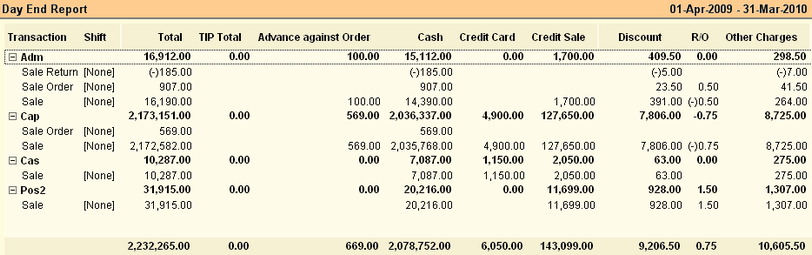
This report gives the list of all Sales related vouchers (Sales Order, Sales, Sales Return & Credit Note) grouped as per user.
Buttons are explained in Using Reports (Register). Buttons specific to “Day End Report” are discussed here:

-A Analysis
|
Press ALT + A or click this button to see MOP Analysis Report.
|
^G Gr Analysis
|
Press CTRL + G or click this button to see Group Summary in MOP Analysis Report.
|
-D Daily Rpt
|
Press ALT + D or click this button to see Transaction Summary Report.
|
-B Bill Size
|
Press ALT + B or click this button to set the bill size in Transaction Summary Report.
|
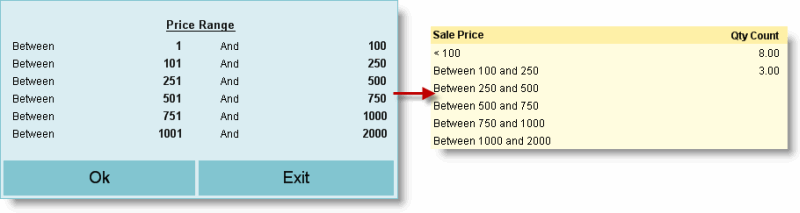
-R Price Range
|
Press ALT + R or click this button to set the price range in Transaction Summary Report.
|
-F5 MOP Summary
|
Press ALT + F5 or click this button to get print out of MOP Summary from POS printer for the last day of given date range.
|
-F6 Sale Rpt
|
Press ALT + F6 or click this button to get print out of Sale Register from POS printer for the last day of given date range.
|
-F7 Stock Rpt
|
Press ALT + F7 or click this button to get print out of Stock Register from POS printer for the last day of given date range.
|
^O Option
|
Press Ctrl + O to get Sale-Finance Report Option. Day End Report options are as follows:
Sale Fin Report Option
|
Breakfast Time
|
Enter breakfast time begins at your shop. Sale between Breakfast Time and Lunch Time will be shown as Breakfast Amount in the Sale-Finance Report.
|
Lunch Time
|
Enter lunch time begins at your shop. Sale between Lunch Time and Dinner Time will be shown as Lunch Amount in the Sale-Finance Report.
|
Dinner Time
|
Enter dinner time begins at your shop. Sale after Dinner Time will be shown as Dinner Amount in the Sale-Finance Report. Dinner Time will continue up to 05:59AM of next date.
|
Grouping On
|
Select Brand / Department / Group / Sub Group. Report will be shown as per the option selected here.
|
Note: "Z Report Option" block will remain unused here.
|
^S Sale Fin
|
Press Ctrl + S to get meal wise Sale Finace Report.
Related Faq:
•Meal wise Sal–Finance Report. •Know total commission amount on Credit Card receipts, deducted by the banker for the given date range. |
|
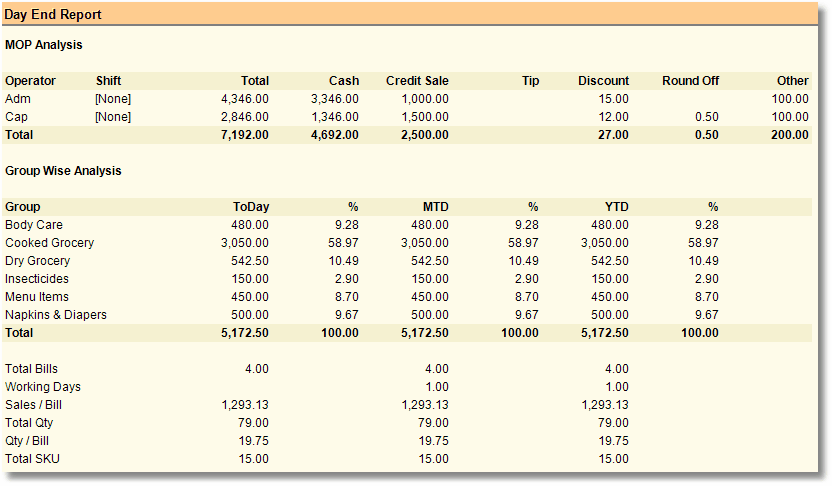
At day end report, Click "-A Analysis" button to get Day End Analysis. It has 4 parts.
1.MoP Analysis of Sales, Advances, Discount etc. for each Operator 2.Product Groupwise Analysis of Current Date, MTD and YTD figures for each Product Group 3.Summary of Daily Transaction 4.Key operations and performance ratio figures This is a key management report and gives the performance results of sales at a glance.
|
Columns in the Day End Report are as follows:
MTD
Month-to-Date
|
Month Turnover Detail.
Sales from the starting day of the Month i.e. 01st to till date.
for e.g as on 09.05.2014 the MTD Sales will be the sales from 01.05.2014 to 09.05.2014
|
YTD
Year-to-Date
|
Year Turnover Detail.
Sales from the starting day of the Financial Year i.e. 01.04.2014 to till date.
for e.g as on 09.05.2014 the YTD Sales will be the sales from 01.04.2014 to 09.05.2014
|
|
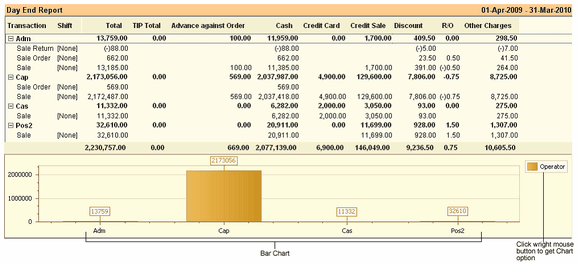
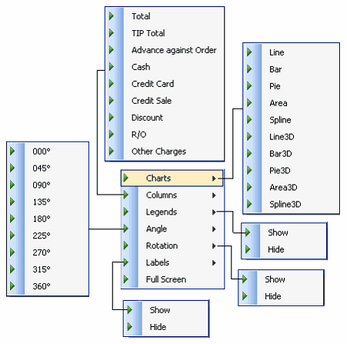
Click "–F11 Chart" Button or Press ALT + F11 to show the transaction chart. When you open the chart show the operator field at corner of chart. Wright mouse button click on operator field, you get some chart option.
|
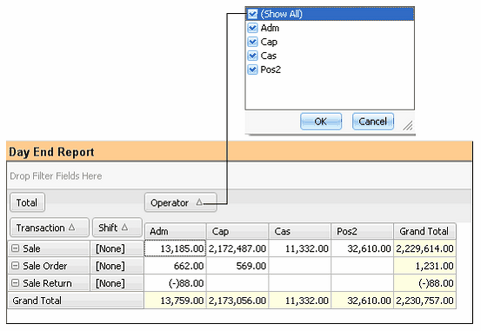
If you want to show report in Pivot Format, click "F11 Pivot" button or press F11. If you show the all users report then right click of mouse button at Operator field and click on all option and if you show the report of any specific users then click on any separate users.
|
Require combined collection detail in Day End Report and Cash Sheet
Scenario : In "Day-End Report - Analysis" and "Cash Sheet", it is required to view user wise cum MOP wise combined collection detail against Sale and Cash on Delivery.
Solution :
●In Day End Report > Analysis added a section "Net MOP Analysis"
●In Cash Sheet > preview designer > added a table for "Net MOP Analysis".
DOS print from Day End Report on Specified Date.
Scenario: The following reports get printed for the current date even if you have selected a different date in the report.
●MOP Summary
●Sale Report
●Stock Report
You might need to print these reports for a given date.
Solutions : The following reports will get printed for the date specified using F2 button.
●MOP Summary
●Sale Report
●Note: The Stock Report will keep on printing as on date because it prints pre-calculated stock without the effect of selected date.