
What is the difference between "24 hour check-in" and "Fixed check-in"?
24 Hour Check-in:
Where the Check-in time is not fixed. Whenever Guest Comes will be checked-in and the time of Arrival will be treated as Check-in time. In this case "Early Check-in Policy" set in the Location Master will not be applicable.
In order to set 24 Hour Check-in Policy please follow the steps given below:
- From main menu go to the Location Master (M > I > L)
- Choose desired Location Master
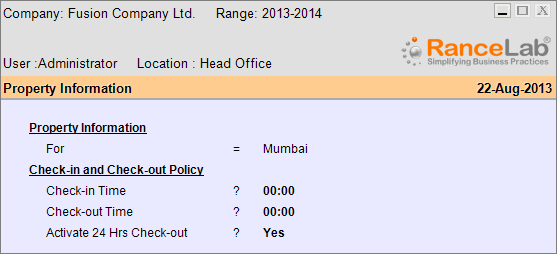
- Set Yes to Property Information field to get the Property Information screen as shown below
- In this screen set Activate 24 Hrs Check-out = Yes under the head “Check-in and Check-out Policy”
- Press ALT + S to save the changes.
Note:
Check-out policies like "Early Check-out Policy" and "Late Check-out Policy" will be applicable as set in the Location Master.
Fixed Check-in:
Where the Check-in time is fixed and predefined. In this case "Early Check-in Policy" will be applicable as set in the Location Master, since the Check-in time is Fixed and Check-in before it may be chargeable.
In order to set Fixed & Predefined Check-in Policy please follow the steps given below:
- From main menu go to the Location Master (M > I > L)
- Choose a desired Location Master
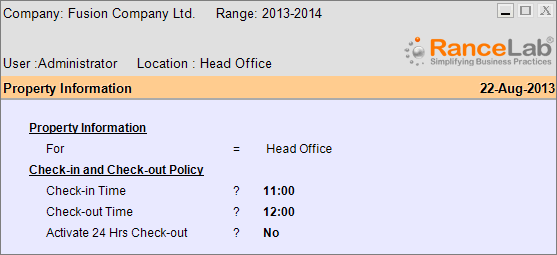
- Set Yes to Property Information field to get the Property Information screen as shown below
- In this screen set desired Check-in Time and Check-out Time under the head “Check-in and Check-out Policy”
- And set Activate 24 Hrs Check-out = No
- Then Press ALT + S to save the changes.
Note:
Check-out policies like "Early Check-out Policy" and "Late Check-out Policy" will be applicable as set in the Location Master.
.