
FAQ
Sales Management
/Reports
/Day End Report
Know total commission amount on Credit Card receipts, deducted by the banker for the given date range.
Scenario:
There is standard 2% commission on all Credit Card receipts, which generally every bankers use to deduct from the total credit card receivables.
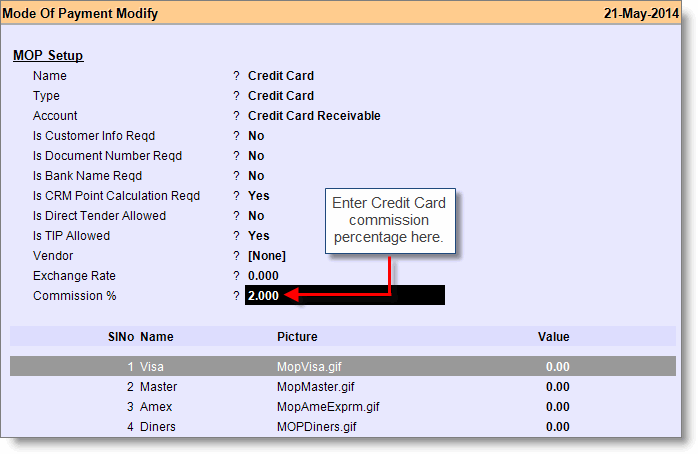
Steps 1: Do the following changes in Mode of Payment:
- From main menu go to the Mode of Payment (M > A > M)
- Press Alt + L to select “Credit Card” mop from the list
- Set commission percentage at “Commission %” field
- Press Alt + S to save the changes.
Step 2: Credit Card commission report:
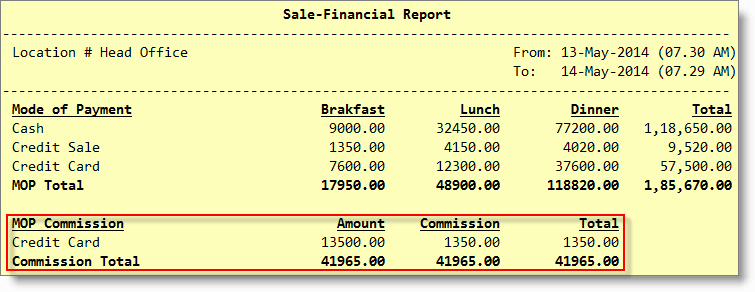
- From main menu go to the Day End Report (S > R > D)
- Press Ctrl + S or click “^S Sale Fin” button to get the Sale-Finance Report
- Here you will get the credit card commission amount for the given date range.
Note:
- Commission Total = Credit Card receipt X Commission % entered in the Mode of Payment master as shown in the 1st step.
- This is only to inform you about the commission on Credit Card receipts, though other features will be unaffected.
..
..