
FAQ
Master Data Management
/Others
/Customer Master
I want to provide extra points to some of my specific customers on their birthday or anniversary date; how to accomplish this?
Answer:
To provide extra points to some of your specific customers on their birthday or anniversary date use the following steps.
- Go to Main > Master Data Management > Others > Customer Master (M> O> C)
- Enter all the details required about that customer
- In ‘Card Type Name’ press Ctrl + N
- Create a new card type by entering a card type name
- Enter other details
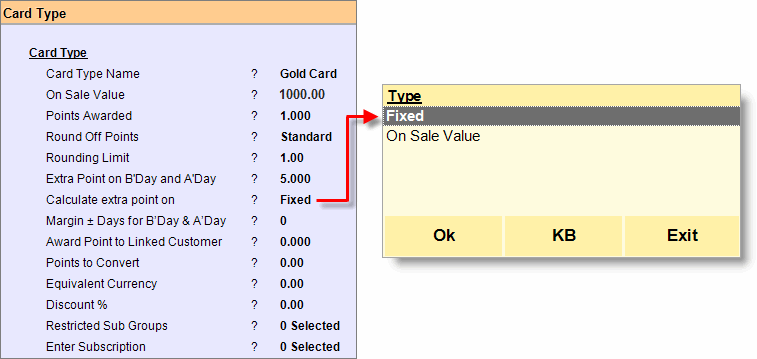
- Set points, you need to add on birthday or anniversary day in ‘Extra Point on B’day and A’day’
- Set ‘calculate extra point on = Fixed’ if you want to add fix point else set it to ‘On sale value’
- If you set ‘calculate extra point on = Fixed’ it will calculate in the following manner…
- Point acquired = 100
- On Sale Value = 1000
- Extra Point on B’day and A’day = 5
- Final point = 105
- If you set ‘Calculate extra point on = On sale value’ it will calculate in the following manner…
- Points aquired = 100
- On Sale Value = 1000
- Extra Point on B’day and A’day = 5
- Now if the customer buys a product of sale value 1000 or above then only he will receive point according to ‘Extra Point on B’day and A’day’ calculation. Let us assume that he buys a product of sale value 800. Then finally…
- Final point = 101
- Save
- Go to ‘Card type name’ field
- Alt + L
- Select newly created card type
- Save
- Now whenever you sale against this customer on his birthday or anniversary day he will receive points according to the above setting.
For more details please visit: