
FAQ
Property Management
/Transaction
How to add room sharer(s) for an existing reservation?
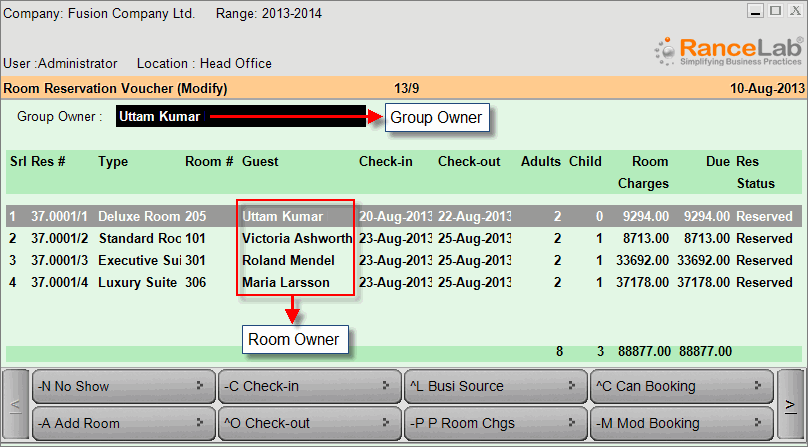
Scenario: At the time of Room Booking it always let us to choose the Group Owner. Primarily the Room Owner will be same as the Group Owner after booking, although we can change desired Room Owner for every room booked using “-M Mod Booking” button in the Room Booking and then selecting desired Guest at "Guest" field in the "Guest Information" screen.
But where do I enter another Guest(s) staying in the same room with the Room Owner itself?
In order to enter the information of another Guest(s) staying in the same room with the Room Owner, please follow the steps given below:
- From main menu go to the Room Booking (H > T > B)
- Book the room in the name of Room Owner
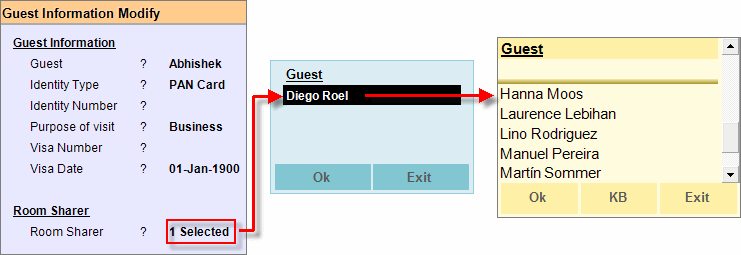
- Press ALT + M to get the Guest Information screen
- In this screen press enter key at the “Room Sharer” field
- Now press ALT + L to select Guest (Room Sharer) from the list
- Click OK then press ALT + S to save the changes.
.
Note:
- You can’t select more number of Room Sharer than that number of Adults has been entered during Room Booking.
- Number of Children will not be counted in this regard, number of Adults will be applicable only.
.