
FAQ
Sales Management
/Reports
/Sale and Sale Return Register
How to add 'day of the week' in the sale register?
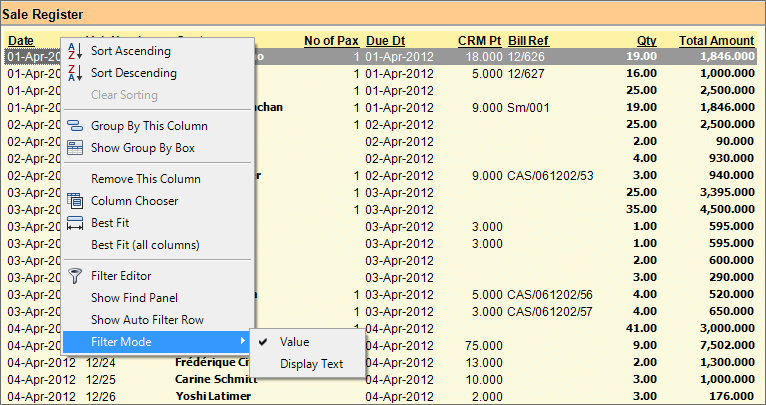
Step 1: Set 'Filter Mode' to 'Value':
- From main menu go to the Sale Register (S > R > S)
- Right click on the column header "Date"
- Set "Filter Mode" to "Value" in the list as shown in the picture below.
Step 2: Add a Column:
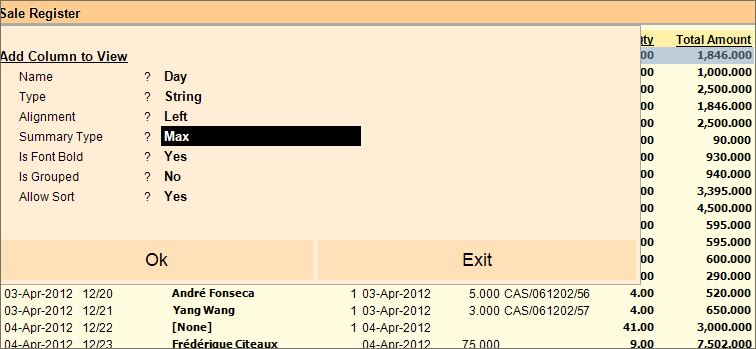
- Press ALT + K or click on "-K Add Column" button in the Sale Register
- Then follow the steps as shown in the picture below:
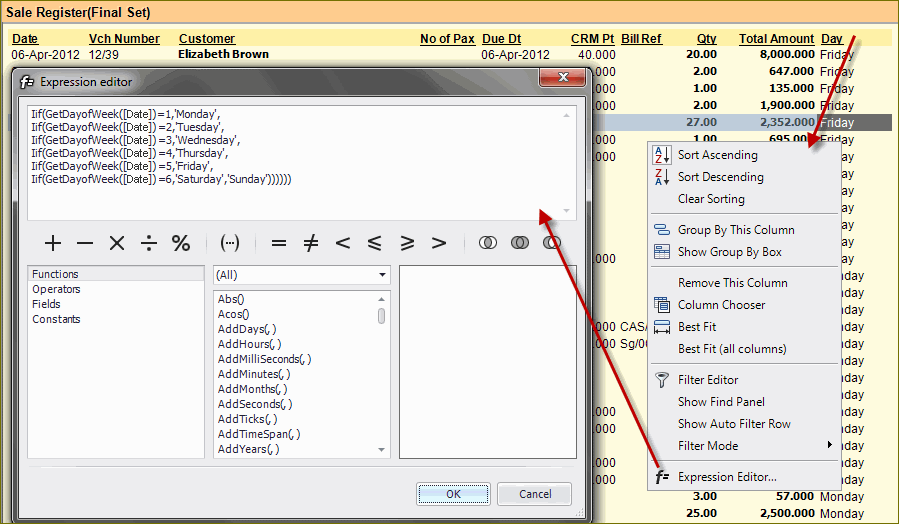
Step 3: Add the following in expression editor:
Iif(GetDayofWeek([Date])=1,'Monday',
Iif(GetDayofWeek([Date])=2,'Tuesday',
Iif(GetDayofWeek([Date])=3,'Wednesday',
Iif(GetDayofWeek([Date])=4,'Thursday',
Iif(GetDayofWeek([Date])=5,'Friday',
Iif(GetDayofWeek([Date])=6,'Saturday','Sunday'))))))
Step 4: Save the report using "F10 Save View" button for future use.
Use following variable to see Month Name in report:
Iif(GetMonth([Date])=1,'January',
Iif(GetMonth([Date])=2,'February',
Iif(GetMonth([Date])=3,'March',
Iif(GetMonth([Date])=4,'April',
Iif(GetMonth([Date])=5,'May',
Iif(GetMonth([Date])=6,'June',
Iif(GetMonth([Date])=7,'July',
Iif(GetMonth([Date])=8,'August',
Iif(GetMonth([Date])=9,'September',
Iif(GetMonth([Date])=10,'October',
Iif(GetMonth([Date])=11,'November','December')))))))))))
...
Use following variable to see Year Name in report:
GetYear([Date])