
How can the Tax be calculated on the actual item rate even after giving the discount?
Scenario:
We are charging tax on actual item rate instead of discounted rate.
For example: Item Rate = Rs.100/-, Discount = 50%, Tax = Service Tax @10.30%.
- Discount Amount = Rs.50.00
- Tax = 10.30 (10.30% of Rs.100/-)
- Total Amount = 100.00 – 50.00 + 10.30 = Rs.60.30
Solution:
Tax can be charged both on actual item rate or discounted item rate. Please follow the steps given below:
Step 1: Create Tax Master:
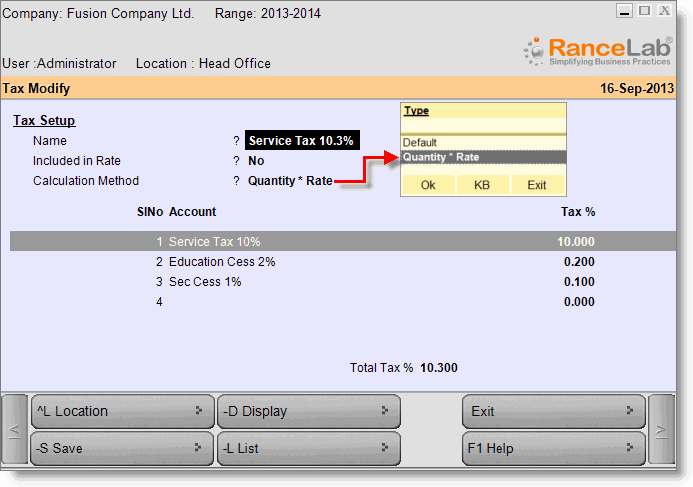
- From main menu go to the Tax Master (M > A > T)
- Create the tax master as shown in the picture below:
Step 2: Setting for tax to be calculated on actual rate:
- In the Tax Master set Calculation Method = Quantity * Rate
- Set Included in Rate = Yes / No as required, for detail please see below imgaes.
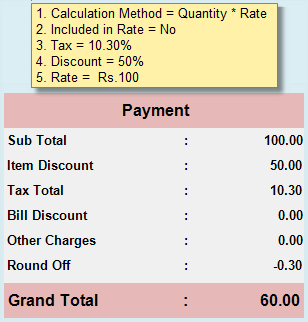
Sub Total = Rate, Item Discount = Rate * Disc%, Tax Total = Rate * Tax%.
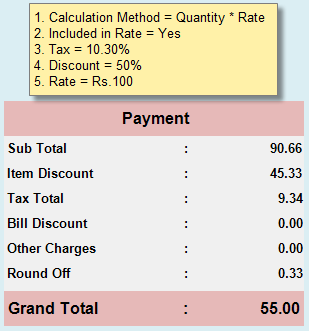
Sub Total = Rate - Tax, Item Discount = Subtotal * Disc%, Tax Total = Rate - (Rate*100/110.30).
OR
Step 2: Setting for tax to be calculated on discounted rate:
- In the Tax Master set Calculation Method = Default
- Set Included in Rate = Yes / No as required, for detail please see below imgaes.
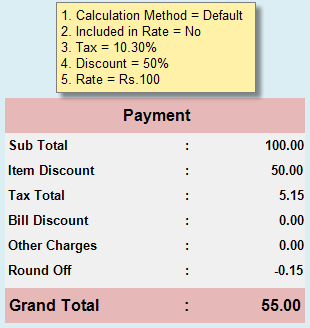
Sub Total = Rate, Item Discount = Rate * Disc %, Tax Total = (Sub Total – Item Discount) * Tax %.
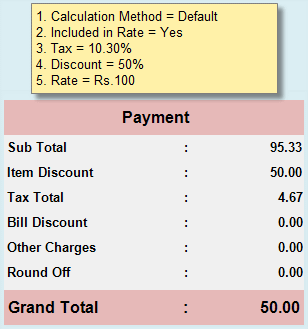
Sub Total = Rate – Tax Total, Item Discount = Rate * Disc %, Tax Total = (Sub Total – Item Discount) * Tax %.