
FAQ
Master Data Management
/Others
/Customer Master
Auto upgrade of card type(s) based on points earned by the customer.
Scenario: We have four types of customers and that are as follows:
- Beginner: All new customers will be provided this card.
- Silver Card: If total points earned by the customer crosses 1000.
- Gold Card: If total points earned by the customer crossed 5000.
- Diamond Card: If total points earned by the customer crosses 10000.
Step 1: Setting up Customer Master Option:
- From main menu go to the Customer Master (M > O > C)
- Press ALT + O to get Customer Information Option screen
- In this screen go to the “Point Range for Card” field and press ALT + L
- Now set the point ranges as shown in the picture below:
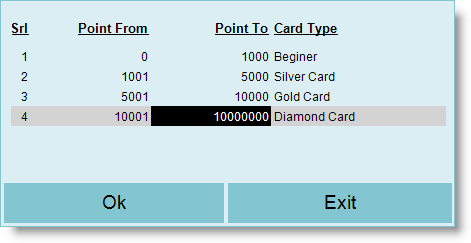
Step 2: Auto upgrade Customer Card Type:
- From main menu go to the Customer Master (M > O > C)
- Press ALT + U or click “-U Card Type” button
- Then system will ask “Do you want to update Customer Card Type = Yes / No”
- Select Yes to upgrade the Customer Card type based on point range defined in Option.