FAQ
Sales Management
/Transactions
/Sale Invoice (Scan POS)
Setting up the open and close shift process for the POS operator.
Requirement: The following work process is required for the POS operators:
Login into Fr6 > Enter Opening (floating) Cash > It will open the shift (batch) automatically > Start Doing Sales > While Exit, it ask for closing balance > Enter the closing Balance > It should close the batch (but z report should not be printed) > Logout the operator to login screen.
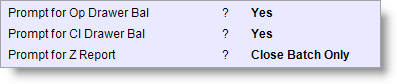
Settings 1: Do the following changes in Sales Options:
- From main menu go to the Sale Invoice (Scan POS) (S > T > S)
- Press ALT + O to get the Sales Option screen
- In the Sales Option set the following as shown in the picture.
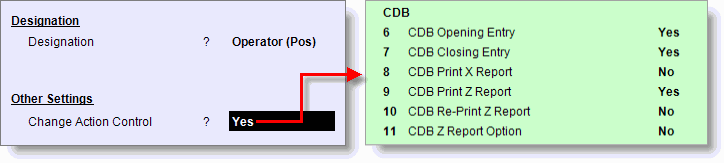
Settings 2: Do the following changes in Designation Master > Action Control:
- From main menu go to the Designation Setup (M > O > D)
- Now set the following as shown in the picture.