Featured Posts

9 Easy to Implement Tips to Increase Sales in a Retail... If you are keen to increase sales in your retail store, here are some easy to implement tips: 1. You should have a lot of signages that indicate to the shoppers where different types of merchandise...

Read more

How can a retail POS system help me run my business... Are you looking for a way to operate your business more efficiently? Are you finding it hard to deal with increasing shrinkage issues? Is unnecessary paperwork and time management a big concern for you?...

Read more

Retail Marketing Success with Enhanced Customer Experience It is considered to be 7 times easier to get the customer back in your shop than to get a new customer in. So what are you doing to make your customers come back to your outlet? Here are some simple...

Read more

Home Delivery of Food: Bon Appétit At The Doorstep... Some of India’s top sit down eateries are building on the wisdom of fast-food chains, saying bon appétit at the doorstep of patrons who are cutting expenses by eating out less. What is...

Read more

FusionRetail enters Minus 6° Minus 6° chooses FusionRetail to be its IT Partner to drive sales and manage business. It is located at Swabhumi, Kolkata's (read East India's) very first Ice Lounge Bar "Minus 6°" Everything...

Read more

  • Prev
  • Next

How Store Management Software Simplifies Operation

Category : Inventory Management, Point of Sale (POS), Simplifying Retail Businesses


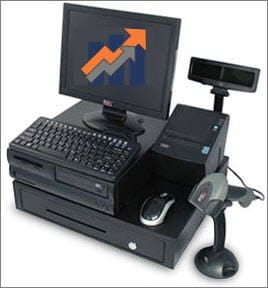
Searching on how best to manage your sales and increase the gross profit? The point of sale (POS) software lets you control your business and maintain an electronic record of your sales in a simplified manner.

The greatest challenge for any business is to maintain proper sale registers and increase the margin of profit. Now this problem of yours is completely taken care of by the retail management software. It is a specialist in managing such problems and gives you the best possible output.

Advantages of using POS software

Your business flourishes with the use of the right software and makes the management of work much easier. The POS software offers you a range of benefits including:

·         Maintaining an electronic sales record

The software makes your work easily manageable. Your energy input is reduced. Electronically maintained records will not allow any mistakes in the sales register.

·         Usage in various sectors for varied purposes

You can use the software for various purposes. This can be used to maintain sale records, otherwise a cumbersome job. Transaction records can also be updated in big businesses.

·         Reduces excessive time investment

If you had to maintain a written record of transactions, imagine the amount of time it would have consumed. Thanks to retail management software, the workload gets heavily reduced. And you can have a perfect error free register maintaining all your records.

·         Maximization of profit

The electronic register gives you a perfect view of the reports. So, keeping track of your gross profit is easy and less time consuming. Now you are free to concentrate on marketing your business to further increase the profits.

These features enable you to maximize the utility of the software and also to expand the business.

Do you get bogged down with complex software? The flexible features with intuitive and friendly interface are an important aspect of FusionRetail management software. It is highly user friendly and the ease of operation is a welcome change from the complexities of the competing products.

Retail management software – a perfect business assistant

Whether you have a small store or a chain, the store management software is there to support you. The flexibility and compatibility helps a varied range of businesses. From departmental stores to textile industries and everything in between. Once you have installed this software, all issues regarding efficiency management, data registering and even records of your customer are totally taken care of.

Precision and perfection in maintaining data allows you to have a clear view of the transactions taking place over a time period. The electronic register does not need any manual work. So number of workers required goes down. That is a major issue taken care of in present highly competitive conditions.

Ready to make the switch to efficiency and productivity? Check out FusionRetail Store management software.


Understanding Barcode and RFID

Category : Point of Sale (POS)

Barcode

A barcode is a computer readable representation of information. Initially, barcodes stored data in the widths and spacing of printed parallel lines, but today they also come in patterns of dots, concentric circles, and text codes. Barcodes can be read by optical scanners called barcode readers or scanner. Barcodes are widely used to implement automatic data capture systems that improve the speed and accuracy of computer data entry.

Some common and widely used barcode symbology
UPC, UPC-A, UPC-E, EAN, EAN-8, EAN-13, Code 39, Code 93, Code 128, RSS-14, CODABAR, INTERLEAVED, DISCRETE
RFID

RFID is an abbreviated form of Radio Frequency IDentification, a technology similar in theory to bar code identification.

An RFID system may consist of several components: tags, tag readers, tag programming stations, circulation readers, sorting equipment, and tag inventory wands. Security can be handled in two ways. Security gates can query the ILS to determine its security status or the tag may contain a security bit which would be turned on and off by circulation or self-check reader stations.

The purpose of an RFID system is to enable data to be transmitted by a portable device, called a tag, which is read by an RFID reader and processed according to the needs of a particular application. The data transmitted by the tag may provide identification or location information, or specifics about the product tagged, such as price, color, date of purchase, etc.

RFID systems can be used just about anywhere, from apparels to accessories, cassettes and cd’s to food products — anywhere that a unique identification system is needed. The tag can carry information as simple as a unique number or complex information.

Usage of Bar code
Almost 95% of packed and packaged items purchased from a department or a grocery store carry a barcode on it. This helps a retailer for faster checkouts and tracking inventory placed in-store or warehouse. Both consumers and retailers have benefited from the usage of this technology. Recently, its usage has expanded to scanning electric or telephone bills, movie tickets and providing entries to sports arenas and temples. In large organizations, bar codes are often used to maintain office file system.

Usage of RFID
The use of RFID is not as wide-spread as bar code. Although, RFID is used
•  as a security device for high-ticket (high-value) goods,
•  to reduce inventory cost by having faster, real-time update of inventory flow, and
•  to one day facilitate human-less store checkouts.

Differentiating barcode and RFID technologies

Theoretically, bar coding and RFID are quite similar; both are planned to provide rapid and reliable item identification-and-tracking capabilities. The primary difference between the two technologies is that bar coding scans a printed label with optical laser or imaging technology, while RFID scans, or interrogates, a tag using radio frequency signals. Because of the low cost of bar code labels, established standards, and global deployment, bar coding is a widely accepted, mature technology, while, in the past, RFID had been limited to niche applications. Furthermore, just as there are different bar code symbologies in use today, there are different RFID standards for RF communications protocols.

Further, RFID tags are often envisioned as a replacement for UPC or EAN bar-codes, having a number of important advantages over the older bar-code technology. RFID codes are long enough that every RFID tag may have a unique code, while current UPC codes are limited to a single code for all instances of a particular product. The uniqueness of RFID tags means that a product may be individually tracked as it moves from location to location, finally ending up in the consumer’s hands.

It will be partial to name one, as bar code and RFID technologies are not mutually exclusive, nor will one replace the other. They are two different technologies with two different cost profiles and application usage. They are both enabling technologies with different physical attributes. Bar codes utilize one-way, serialized, and periodic data. RFID utilizes two-way, parallel, and real-time data.

In recent times, awareness for both the technologies has grown to a huge extent. Almost all the major retailers of Class A and Class B cities have implemented these solutions as core component of their business. To generate maximum output from limited resources, one has to think out-of-the-box. The use of these technologies is increasing like a rapid fire. The scope of these systems is huge and increasing day-by-day to support retail industry.

What is POS or Retail management software and why it is required?

1

Category : Point of Sale (POS)

“The term speaks for itself”. POS or Point-of-Sale software is used at location where goods are sold to customers. All sales transaction are made through the software and stored in computer. You provide information like item description, selling price, quantity sold, amount of discount given, tax collected and a few more.

Since the computer records everything, it automates all kind of tasks for you. For example, it gives you a few reports on key tips such as sales for the day, day end report, tax registers, stock statement and more for any specified period.

This is just and example of POS software but there’s lot more to it.

Infact, a few good POS software works as a complete retail management system and does one or more of the following:
·         Point of Sale
·         Inventory / Stock maintenance
·         Financial / Retail Accounting
·         Customer Relationship Management
·         Management Information System
·         Supply Chain Management
·         Store Management
·         Automatic Order Generation
·         Planogram / Space Management
·         Electronic Data Interchange
·         And much more
Now you must be thinking that one or more of above listed features are easily available in any general business application or any standard accounting software. They simply track inventory and maintain financial books. They’re all same.


WRONG…

Every system is designed to suite specific need. There are some features or benefits in common because they share a common business model. But when you start evaluating you will find…
POS software is designed to suite your business
A retail or pos software is designed to suite the needs of a retail atmosphere where as a generic business application targets mass and do not cater to specific needs of retail.
Fast, Accurate and Time saving
Another advantage of retail software is they use barcode technology which makes checkout faster, accurate and there is minimal scope of human errors.
Integrated system saves time and money
Retail management software has add-on modules like loyalty programs, decision-making tools and reports, and also keeps financials in place. This saves your time as you have to record each transaction in only one system and also helps you in fast retrieval of information as and when required. Hence scope of human errors is minimized.

USP – Unique Selling Proposition

Category : Point of Sale (POS)

The term USP or Unique Selling Proposition is frequently used now a days. This is something which helps you stay ahead in the competitive world, something that makes you different from your competitors, be it a product or a service or both.

By following these simple steps you can easily find out what is your (your store’s) USP ?

1. Ask Yourself – You need to find out what you offer to your customers which is different from what your competitors offer. You can also consider your layout including furniture & fixture, interior and exterior decor, product range, services you offer. This is what completely makes you different and why people buy from you.

2. Ask your Customers – Why they are here? They may be here because your store is close to their house, or you are located in a market complex or you actually provide good customer service and support when they need it. Believe me, this is the real practical input that people often overlook.

3. Ask your Team – staff – Ask them what makes them work here. It’s only the pay or the relationship you share with them. Ask them what makes them feel good here. What are your positives and negatives including products and services you offer.

Once you have the complete list, make a summary of top 5 or 10 answers. Now you have something in common and something uncommon. This is what is your USP and what exactly you are looking at.

This USP makes you stay ahead of the competition, makes you the leader. You can also use some phrase or sentence to make a punch line for your store, business or organization. This punch line will help bring down the customer to your door step and ultimately increase your brand value.

Your customer want to pay half in Credit Card and Half in Cash.

Category : Point of Sale (POS)

FusionRetail helps you to do that in just a 2 key press.

  • At the POS screen press F10 for Tender Screen
  • Then Press Insert at the cash mode which is default
  • Next enter the cash amount
  • And then scroll to Credit Card Field and again press Insert key
  • It will automatically calculate the balance amount for you.

Like wise you can accept multiple mode of payment from a customer.

The barcode is not reading at the pos counter.

Category : Point of Sale (POS)

The barcode is not reading at the pos counter and other 2 customers standing in queue. 

If your operators says “please do not buy this – select something else” you loose 20% margin on that sale. 

FusionRetail helps you to be prepare for unexpected.

It’s innovative search function is easy to learn. The operator can find the product by SKU Code, Name, Brand, Group and Department Etc.

The customer says “I bought this red shirt yesterday but can you change it to black one”

Category : Point of Sale (POS)

The customer says “I bought this red shirt yesterday but can you change it to black one”.

Technically speaking, the red shirt needs to be stoked-in and the black shirt needs to be stocked-out. This becomes more complex if there is a change in price.  This involves a complex process of Sales, Sales Return and adjusting the price difference. 

FusionRetail Exchange function from the POS Screen — It does all the calculation for you on a single key press. 


Hold the bill – I will just come back

Category : Point of Sale (POS)

You have already scanned 20 items for a customer and the customer wants you to the transaction till he come back with some more item and there are 2 more customers standing in the queue.
In the FusionRetail POS use these function to handle this kind of scenario

  1. Press the HOLD button or press  “Ctrl + R”
  2. It will ask some input so that you can identify that customer later.
  3. Enter some thing like “blue shirt”
  4. Proceed for the next customer checkout.
  5. Once that customer comes back and asking for two more item to be added in his bill
  6. Just press Retrieve or  press “Ctrl + R”
  7. From the list select the Blue shirt
  8. Scan the items to be added to the bill.
  9. Tender

***Improving customer service at the Cashier Line in your store***

Category : Point of Sale (POS)

When giving change to retail customers, do NOT, as most cashiers do, hand them the receipt, coins, and bills all at once.

Reason : the customer already has one hand occupied holding the item purchased, making it awkward and difficult to separate these three items.

A better practice for your cashiers:

  • First input the total amount customer is giving into the POS system.
  • FusionRetail POS Tender will show you the balance to be returned.
  • Use Customer Display to show the value of current item and total amount.
  • Then,  put the receipt in the bag for the customer instead of handing it to him.
  • Next, give him the coins, and wait until he puts them in his pocket.
  • Finally hand him the bills, which he will put in his wallet.