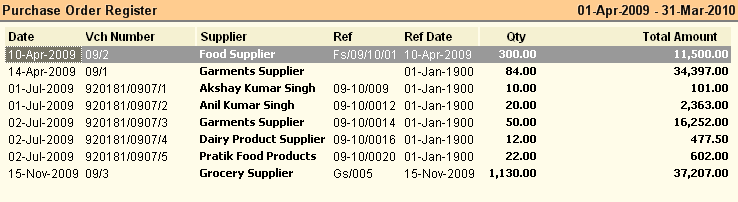
This report gives the list of Purchase Orders.
Buttons are explained in Using Reports (Register). Buttons specific to “Purchase Order Report” are discussed here:
 
-A Adjust
|
Press ALT + A or click this button to adjust the Pending Purchase Order quantity.
Suppose you have ordered 100, received 75 against the order and now decided not to purchase balance 25. Then you have to adjust that transaction otherwise every time this will show as pending in the report.
Note:
Adjustment is only possible in Register View Report.
|
^B Barcode
|
Press CTRL + B or click this button to print bar-code for selected transactions or item entry rows. This will work both in Register View and Product View. You can select one or more rows and print them together.
|
^S Sale Order
|
Press CTRL + S or click this button to copy the selected Purchase Order as a whole to Sale Order Voucher. This will work only in Register View.
|
-F7 POQ
|
Pending Order Quantity. Press ALT + F7 or click this button to see the quantities pending to be received /purchased. This will add following columns to the report:
•Order Qty = Show total Order Quantity. •Pur Qty = Show total Purchase Quantity. Data of Purchase Challan (Receipt Note) Voucher will not affect this. •Bal Qty = Order Quantity-Purchase Quantity. |
|
In order to see Pending Sale Order Report please follow the steps given below:
1.Press ALT + V to see Purchase Order Report in Product View
2.Get the following columns from the Column Chooser if they are not exist in the product view report
▪Qty = Actual Purchase Order.
▪Received = Items received against the order. Both Purchase Challan and Purchase Invoice will affect the data.
▪Adjust = Adjusted Quantity.
▪Balance = Qty - Received - Adjust.
Related Faq:
•How to add 'day of the week' in the sale register?

