
Send SMS reminder of outstanding balance to the customers on schedule intervals.
Scenario:
Apart from credit sale and keeping track of outstanding balances, now you can send message automatically to remind customers about their balance dues on schedule intervals.
Steps:
- From main menu go to the SMS Scheduler (T > M > S)
- In the SMS Scheduler screen set “Outstanding Reminder” at “Report” column
- Set other columns like Frequency, Time, Is Active etc
- Set text message variable of the reminder at “Body” column
- Press Alt + S to save the changes.
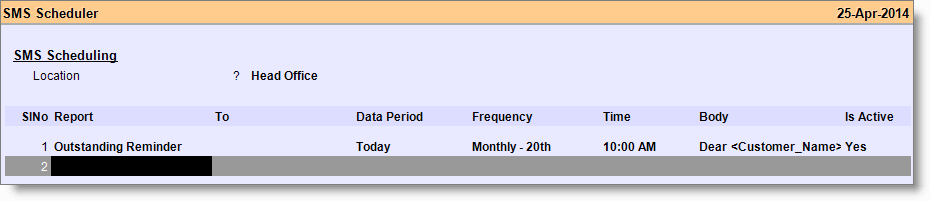
Image Summary: Message of outstanding ledger balance will be sent to the customers on every 20th day of the month at 10:00AM automatically.
Sample variable:
Dear <Customer_Name>, Thank you for shopping with us. We are pleased to provide you with a summary of outstanding balance. Your Card ID <CardID> Total Due is <Currency> <Amount>. Please ignore if already paid.
Sample message as per above variable:
Dear Sumit Sharma, Thank you for shopping with us. We are pleased to provide you with a summary of outstanding balance. Your Card ID C00459 Total Due is Rs.12750/-. Please ignore if already paid.
.
Note:
- It will send SMS to the customers under the following conditions:
- If “Allow Credit Sale” field is set to “Yes” in the Customer Master
- If Ledger Account is defined in the Customer Master
- If customer’s ledger balance is in debit
- If “Send SMS” is set to “Yes” in the Customer Master > Other Information
- If Customer Master has mobile number.
- Whatever “Data Period” you choose, it will work as Today only.
.